Filtering by tag: Website Management

No image

Editing an Existing Page

To edit a page, sign in to Wagtail using the employee login button in the bottom right corner of the website. If you are already signed in, you'll see a bird icon instead. Click on the bird and…

illustration of a boat anchor

Anchor Links on Extension Websites

We heard some feedback from web content editors that requrested anchor links to be added as a feature in Wagtail. If you previously used anchor links in WordPress, you may need to go back and edit…

No image

Digital Accessibility & the Extension Website Platform

Our Extension website platform, built in Wagtail, includes some features to help ensure your content meets digital accessibility standards. When you finish creating a new webpage or news post, use…

No image

Accessible Newsletters

Newsletters should be created in an accessible format. Though PDF files have been widely used in the past, we do not recommend them as they are not the most accessible or the most mobile-friendly…

No image

Accessibility and PDF Files

As we work to make all of our digital content accessible to everyone, Portable Document Format (PDF) files can be some of the more challenging and daunting ones to tackle. Any PDF files uploaded to…

No image

Content Blocks

Pages and news posts in the Extension website system are built using content blocks.There are many content blocks available, and we hope to continue to add new feautres to allow you to customize the…

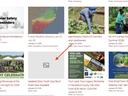
Screenshot showing a news post missing a featured image with just a gray box.

Image Best Practices

Our new Extension website design is more image-focused. Carefully selecting images and following these guidelines will help make your pages look polished. Always add a featured image to your news…

No image

WagTail, the New Extension Website Platform

Extension websites are managed through a platform called Wagtail. This guide walks you through common tasks needed for managing your website. If you need additional help, please send us your…

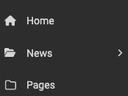
Screenshot of News and Pages Menu options

Posting a News Article in Wagtail

Create a New News PostClick on "News" in the Wagtail DashboardSelect "Local News"

Universal Access Icon (Stylized figure of a person in a circle)

Digital Accessibility

When creating digital content for Extension (emails, website news posts and pages, videos, social media posts, etc.), it is important to keep principles of accessibility in mind.Below are some…