As you've gotten more familiar with building web pages and news posts in Wagtail, we hope you've taken some time to explore and set up new features like County Program Pages!
If you have questions about Program Pages, please check out the FAQ below and join us for our upcoming Virtual Training.
The old WordPress website management system did not have program pages. Program pages are a new page type available for county websites that are designed to allow you to showcase what you are doing in your county centers in each program area.
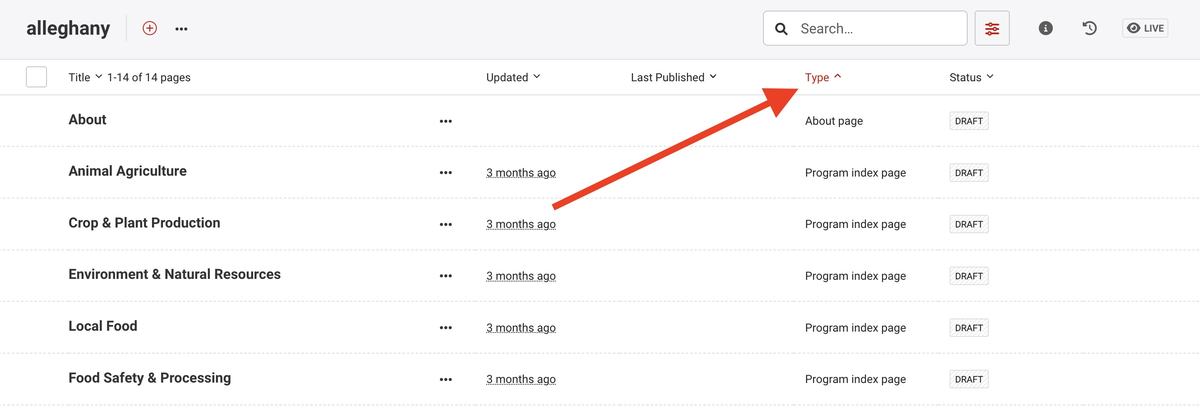
County staff can go to the "pages" menu in their Wagtail dashboard to find each of the Program Index Pages in "draft" mode. You can filter your page listing by page type to make it easier to find them all.
Each program page has template materials to show you some of the types of content you can add, but you are encouraged to edit these draft pages and customize them to describe the programs you offer! If you publish them as-is, the content will be very vague and generic.
Add/edit/delete the content blocks in the template to make each page your own.
Frequently Asked Questions About Program Pages
Q: I've seen some counties that don't have any programs listed in their menu. Did they remove them?
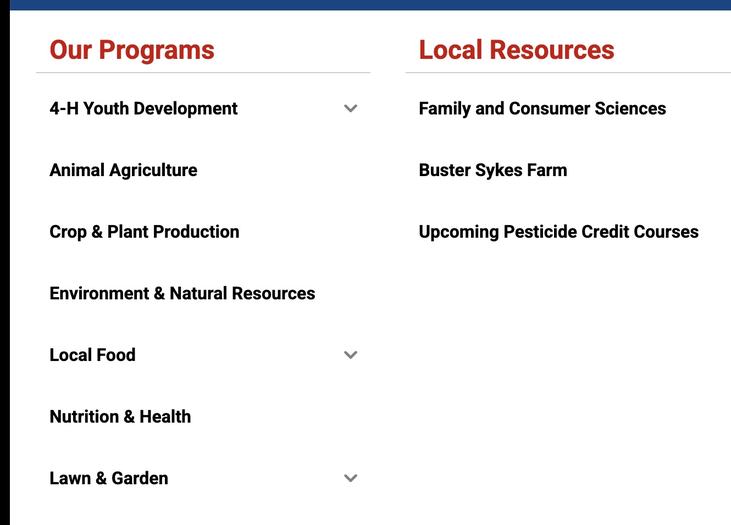
A: If program pages aren't showing in the menu, it's because they haven't yet been published. Each county should edit its program index pages to reflect what they offer, and when they are published, they will appear in the menu. If you don't do anything in a particular program area in your county, you can leave the page in draft mode, and it won't appear in your menu.
Q: Can I edit the title of a Program Index Page?
A: No. The Program Index Page titles are consistent across all the county sites and are made to correspond with ERS reporting areas. You can name subprogram pages however you like, but you cannot edit the main Program Index Page. This ensures there is some consistency for navigating the menus.
Q: I already have a 4-H page under local resources. What should I do?
A: Take some time to go through your local resource pages. Some of your links under local resources may cover program area content. Please work on moving that content into the new Program Page format, and when you've finished designing and publishing your program page, you should unpublish or delete the duplicate information from local resources.
Eventually, you should have all your program content under "Our Programs," and the Local Resources menu can list anything that doesn't quite fit in programs, like Newsletters, Podcasts, Venue Rentals, etc.
Q: Can I convert my existing page into a program index page?
Unfortunately, you cannot convert a standard page into a program page; you'll have to manually rebuild it. However, this is a great time to update your content, make use of new content block features, and ensure your content is up-to-date!
Standard pages cannot be converted to program pages, but you can move pages to nest under your main Program Index Page.
Q: What content goes on program pages?
A: You can add any type of content block to a program page. Customize the page with your own photos from events, text describing what you offer, staff blocks to direct users to contact you, add videos, links to resources, etc! Make it your own!
Q: How do I add relevant news to my program page?
A: The tag news block allows you to pull in news articles from your main news feed according to specific tags. If you'd like news on your program index page (or any other page), add a tag news block to your page content and insert a list of tags related to that program. i.e., for 4-H Youth Development, your tags might be: "Youth, 4-H, Shooting Sports, Youth Livestock, Summer Camp," etc. As long as you tag your news articles with matching tags, they will get pulled into the news block.
Q: Can my program index page have subpages?
A: Yes! You can add two types of child pages to any Program Index Page.
Subprogram pages should be used to add pages that describe programs you offer within that program area, for example, "NC State Extension Master Gardener℠ Volunteers" is a Subprogram of Lawn & Garden, or a Farmers' Market might be a subprogram of Local Foods. Subprogram pages will automatically be added to the menu.
Standard pages can be used for any additional supplementary information related to that program area. i.e., if you have a specific page about online enrollment, equipment rentals, competitions, etc. Standard pages are not listed in the menu, but you can add links to them on the Program Index Page as regular links, Buttons, or Icon Grid Links.
Have additional questions? Please reach out to us! Contact eithelpdesk@ncsu.edu or join us for our trainings by signing up in XLMS. We are here to help and are happy to get on Zoom and work through troubleshooting with you.