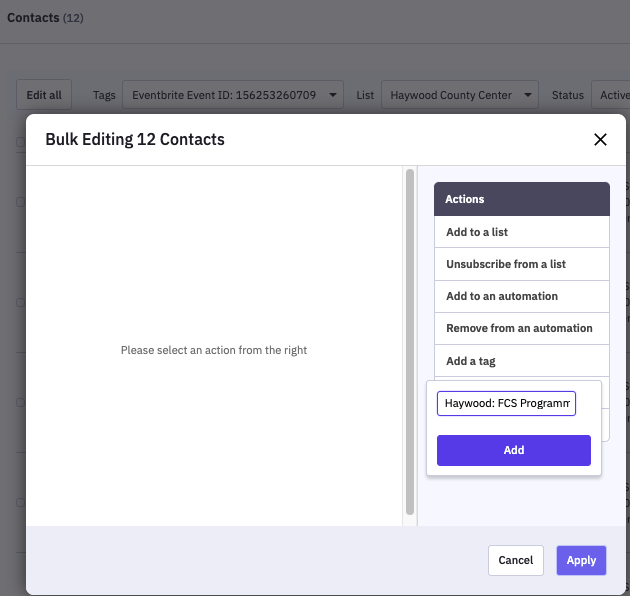
Individuals who attend (and who you mark as attended) your county's Extension Eventbrite events are automatically imported into ActiveCampaign and added to your county list. This factsheet will tell you how to find these records and add more meaningful tags.
Each attendee is tagged with four tags. You can search on any of these tags to find contacts on your list who attended Eventbrite events, but only the Eventbrite Organizer ID and the Eventbrite Event ID tags are guaranteed to be unique to your county.
- Eventbrite Registrant
- Eventbrite Event: Your Event Title
- Eventbrite Organizer ID: Your County's 11 digit organizer ID
- Eventbrite Event ID: Your Event's 12 digit event id
All of your county's Eventbrite events have the same Eventbrite Organizer ID. If you search your ActiveCampaign Contacts for your Organizer ID tag, ActiveCampaign will return a list of all the people who you have marked as attendees of your county's events.
Every Eventbrite event has a unique Event ID. If you search your ActiveCampaign contacts for your Eventbrite Event ID tag, ActiveCampaign will return a list of the attendees of that specific event.
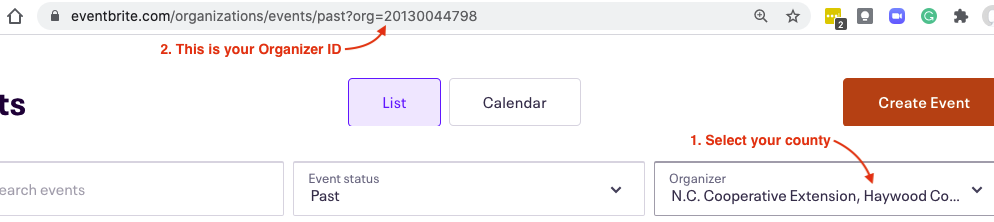
Where Do I Find Our Organizer ID?
- Log in to Eventbrite and go to Manage my Events
- Select your county in the Organizer window
- Your Organizer ID is the numerical string at the end of the web address for that page.
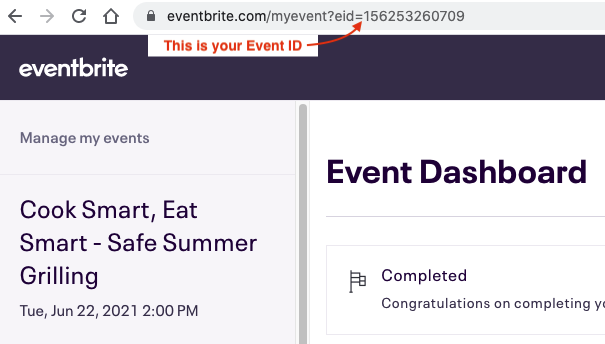
Where do I Find the Event ID?
- From Eventbrite's Manage my Events page, search your Past Events to find and open the specific event
- The Event ID is the numeric string at the end of the Event URL
Why Aren't My Attendees in ActiveCampaign?
You must mark attendance in Extension's Eventbrite. Contacts are only imported into ActiveCampaign if they attend Eventbrite Events. They are not imported if they are not marked as attended.
Add Meaningful Tags
You may want to add existing or new tags to these contacts to include them in your campaign segments for future mailings.
Once you've found the Event attendees you're interested in, use ActiveCampaign's Bulk Editor to apply a new tag to everyone in the list.